Information system for admission to the Academy of Public Administration under the President of the Republic of Kazakhstan
IMPORTANT DATES
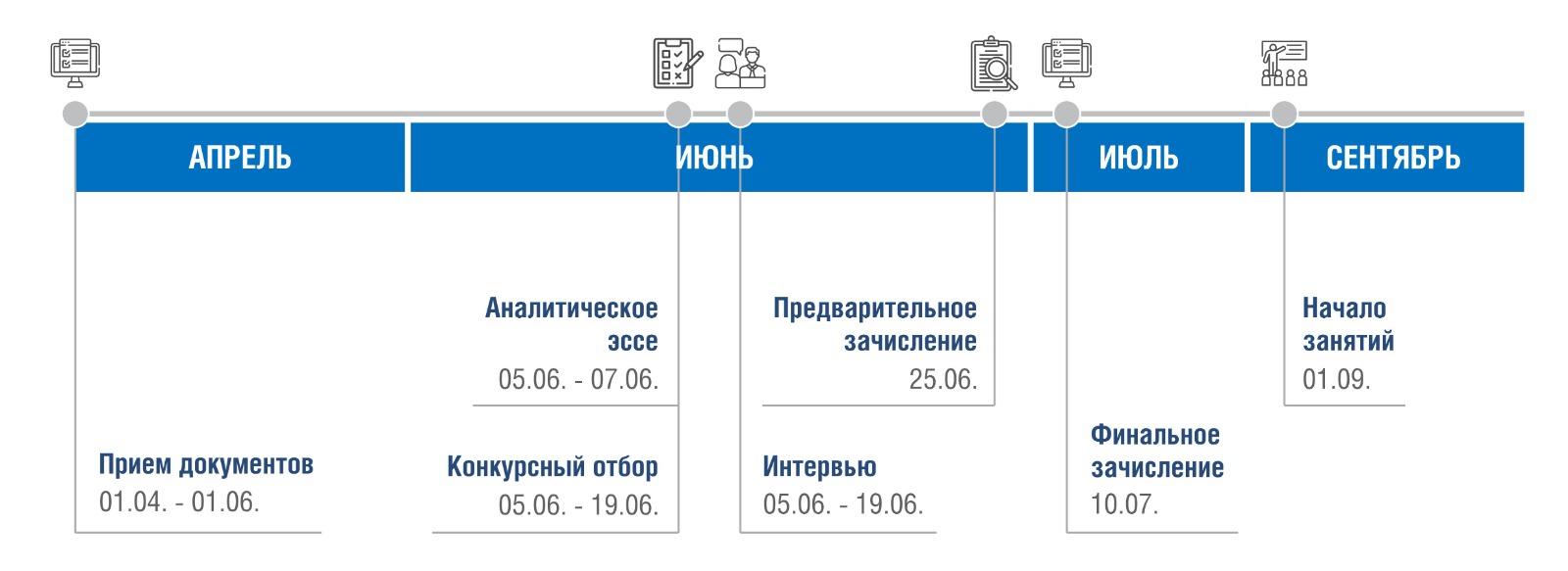
Admission Process

Step 1
Registration/Login
In the Information System of the Academy admission.apa.kz, click on the Apply button, then you need to select the citizenship status «Resident» or «Non-resident».
By selecting the status of «Resident» you log in using the electronic digital signature (EDS) and fill in the required fields.
If you have already been registered before, click the «Login» button, then you can go to your Personal Account using an EDS.
Foreign citizens, having chosen «Non-resident», immediately proceed to filling in the data.
Carefully read the agreement on the collection and processing of personal data, as well as the user agreement and check the confirmation with a Checkmark ✅.
In the Notification Feed, carefully read the Admission Rules for the 2025-2026 academic year.
By selecting the status of «Resident» you log in using the electronic digital signature (EDS) and fill in the required fields.
If you have already been registered before, click the «Login» button, then you can go to your Personal Account using an EDS.
Foreign citizens, having chosen «Non-resident», immediately proceed to filling in the data.
Carefully read the agreement on the collection and processing of personal data, as well as the user agreement and check the confirmation with a Checkmark ✅.
In the Notification Feed, carefully read the Admission Rules for the 2025-2026 academic year.

STEP 2
Formation
of the
application
The application is submitted in the upper left corner of the page, in the «My Applications» section by clicking the «Submit Application» button.
In the application, you must complete all sections by attaching all required documents and clicking «Save» at the end of each section.
If the data obtained from the «E-kyzmet» Information System is outdated, please contact the HR department of your government agency to update them.
After updating the data, please click on the «Update Data» button to synchronize the information. .
In the application, you must complete all sections by attaching all required documents and clicking «Save» at the end of each section.
If the data obtained from the «E-kyzmet» Information System is outdated, please contact the HR department of your government agency to update them.
After updating the data, please click on the «Update Data» button to synchronize the information. .

STEP 3
Certificate
confirming
the level of
Kazakh language
proficiency
When filling out the application, in the «Kazakh language» section, you must select one of the types of certificate that you already have.
By selecting «Kaztest» - a window for attaching will appear, where you need to attach your certificate.
If you have passed «QazaqResmiTest», you must select the level you have scored and click «Save», then a green notification will appear stating that your certificate has been found, since the Academy system is integrated with the QazaqResmiTest system.
By selecting «Kaztest» - a window for attaching will appear, where you need to attach your certificate.
If you have passed «QazaqResmiTest», you must select the level you have scored and click «Save», then a green notification will appear stating that your certificate has been found, since the Academy system is integrated with the QazaqResmiTest system.

STEP 4
Job
When filling out job information, it is necessary to check the information downloaded from government systems, including the Track Record, for inaccuracies and relevance.
If errors are detected, contact the HR department at your place of work to update them.
After that, click «Refresh» to update the data, then «Save». If the data is not uploaded, enter it manually.
If errors are detected, contact the HR department at your place of work to update them.
After that, click «Refresh» to update the data, then «Save». If the data is not uploaded, enter it manually.

STEP 5
Sending
the application
After completing the above steps, be sure to click on the «Submit» button. Now the application is considered completed.
After completing the application, you will see the status «Waiting for response». At this time, it is not possible to make changes to the application and replace the uploaded documents.
Managers of the Admissions Committee process your application data within three working days. In case of providing an incomplete package of documents, and/or expired documents, the Admissions Committee notifies you of the need to supplement or replace the documents with the status «For revision».
In this case, you need to have time to correct all the comments before the end of the acceptance of documents.
(25.06.2025 23:59:59)
After completing the application, you will see the status «Waiting for response». At this time, it is not possible to make changes to the application and replace the uploaded documents.
Managers of the Admissions Committee process your application data within three working days. In case of providing an incomplete package of documents, and/or expired documents, the Admissions Committee notifies you of the need to supplement or replace the documents with the status «For revision».
In this case, you need to have time to correct all the comments before the end of the acceptance of documents.
(25.06.2025 23:59:59)

STEP 6
Completion
of the application
Periodically check your Personal Account for notifications in the «My Applications» section to find out about the status of your application.
If you meet all the requirements, you will see the status «Waiting for sign», after which you will need to sign your application with an electronic digital signature with key RSA.
Further, your status will change to «Allowed to the competition».
If you meet all the requirements, you will see the status «Waiting for sign», after which you will need to sign your application with an electronic digital signature with key RSA.
Further, your status will change to «Allowed to the competition».
WE ARE WAITING FOR YOU AT THE STAGES OF COMPETITIVE SELECTION!
EDUCATIONAL PROGRAMS
MASTER'S PROGRAMS
full-time training courses with taking a break from work within one year:
- Public Administration;
- Digital Public Administration;
- Digital Analytics and Artificial Intelligence in the Public Sector
full-time training courses with taking a break from work within one and a half years:
- Strategic Human Resource Management;
- Regional Development
full-time training courses with taking a break from work within two years:
- Public Policy;
- International Relations;
- Economics
one year training courses based on the principle of modular training:
- Public Policy;
- Business Administration;
- Regional Development
DOCTORAL PROGRAMS
full-time training courses with taking a break from work within three years:
- Public Administration;
- Economics;
- International Relations;
- Digital Public Administration
three years training courses based on the principle of modular training:
- Digital Public Administration
Find more information about educational programs on the www.apa.kz website

Instructional video
FAQ
The period of studying at the Academy is counted towards the civil service tenure only for civil servants who were admitted through a referral from a government agency.
No, a civil servant in a temporary position is not eligible to participate in the competition for state-funded training, as a state body may only send a civil servant holding a permanent staff position.
A civil servant who has enrolled in a state-funded training course retains his/her job (position) based on a tripartite agreement between the Academy, the student, and the state body. The time spent studying at the Academy is considered as educational leave.
Yes, the certificate must be valid at the time the document is attached to the system during the submission period.
The applicant should register on the qrt.kz website, make a payment, and then take the online test at any convenient time.
It is possible to change the chosen educational program in the personal account of the Information System admission.apa.kz before the end of the document acceptance period, i.e., before June 1 of this year. In this case, it will be necessary to update the referral from the state body to reflect another chosen program.
During the interview, questions may be asked to determine the level of applicants' professional and personal competencies, their motivation for learning, knowledge of strategic and program documents of the state planning system and understanding of the regulatory legal acts of the Republic of Kazakhstan.
Civil servants, representatives of subordinate organizations financed from the state budget, entities of the quasi-public sector, and deputies of maslikhats financed from other sources which are not prohibited by the legislation of the Republic of Kazakhstan are eligible to study in modular educational programs.
The training period for modular programs is 12 months, with the academic year divided into 6 modules. Each module consists of 2 weeks of offline training and 4–5 weeks of distance learning. Additionally, the educational program includes industrial practice, internships, and the defense of the master's project.
A room in the dormitory (House of Young Civil Servants) is provided to those admitted to full-time study based on an application and a certificate confirming the presence or absence of real estate in Astana.